
|
Schematics tab > Wiring group > Edit |
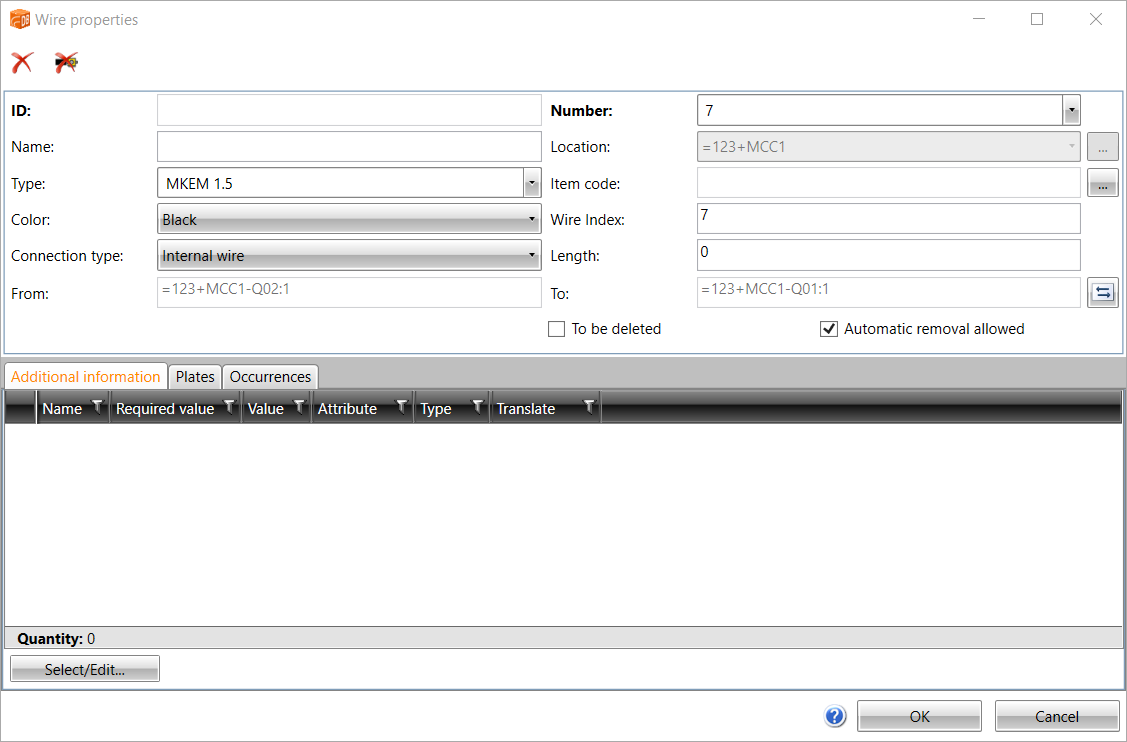
With this function, you can edit internal wires, wire harnesses and cable wires.
These instructions are about internal wires and wire harnesses. For information on editing cable wires, see Edit cables and cable packages.
Do the following:
-
Indicate the internal wire you want to edit. The Wire properties dialog opens.
-
Edit the desired information.
-
For wiring harnesses, you can edit the ID.
-
You can edit wire name, number, type and color.
-
You can change the From and To direction by clicking the
 button.
 -
Select To be deleted, if you want to delete the wire from the project database.
-
Select Automatic removal allowed, if you want to delete the wire automatically after the last occurrence has been removed from the project.
-
-
Edit additional information and plates as necessary.
- You can select and edit additional information on the Additional information tab by clicking Select/Edit.
- You can select and edit plates on the Plates tab by clicking Select/Edit.
-
Save the changes by clicking OK.

With the  button, you can delete a wire if it has no occurrences.
With the  button, you can delete wiring information from the drawing and the database.