Schematics tab > Markings group >  References menu > Define cross-reference's primary object References menu > Define cross-reference's primary object |
| Schematics tab > Markings group > References menu > Define cross-reference's secondary object |
| Schematics tab > Markings group > References menu > Remove cross-reference definitions |
|
Schematics tab > Markings group > |
With these functions, you can define and remove cross-references:
-
Define cross-reference's primary object – Define cross reference's primary object (usually a contactor). If the symbol has the E_CROSSREF attribute, cross references are marked to it and the attribute is turned on. If you select to show cross references in pins, the E_CROSSREF attribute is turned off.
-
Define cross-reference's secondary object– Define cross reference's secondary object. Primary and secondary objects are linked via ID attributes, so secondary attribute must have an attribute which contains word "E_ID".
-
Remove cross-reference definitions – Remove cross reference definitions from primary and secondary objects.
-
Define a cross-reference between two points manually – Add a generic cross reference between two points.
 Show/hide procedure
Do the following:
- Pick reference starting point.
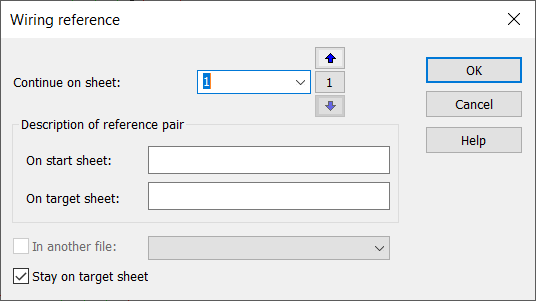
- Select the sheet where you want to continue and pick target point of the reference.
-
Continue on sheet – Sheet of the reference end point. Can also be same sheet as the target point.
-
Description of reference pair – Informal description of the reference start and target points.
-
In another file – Reference goes to another drawing.
-
Stay on target sheet – After placing the target point, do not return to starting sheet (default behavior).
Cross references are generated automatically when contacts are inserted.