Layout tab > Other functions group >  List functions menu > List functions menu > Count quantities
from whole drawing List functions menu > List functions menu > Count quantities
from whole drawing |
| Layout tab > Other functions group > List functions menu > List functions menu > Count quantities
from selected elements |
With these functions, you can count the number of the electrical outlets from the opened drawing or selected elements.
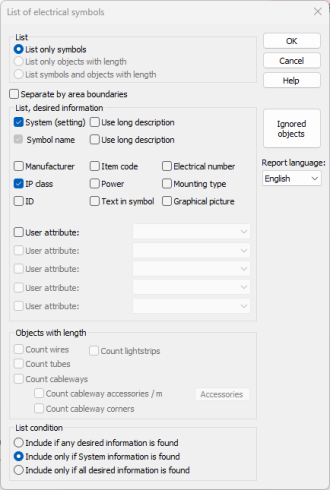
The quantity calculation function is divided into four sections:
-
List – Select whether you want to calculate symbols, objects with length, or both.
-
List, desired information – Select what information you want to list for each object.
-
Objects with length – Select which objects with length you want to calculate.
-
List condition – Select the condition for listing objects:
-
Include if any desired information is found – Use this option when you count quantities from a drawing that was drawn using some other program. All symbols have at least a name, so this list condition includes all symbols.
-
Include only if System information is found – Use this option when you count quantities from a drawing that was drawn using Electrical because only electrical symbols have system information, so the quantity calculation does not include other symbols.
-
Include only if all desired information is found – Use this option when you want to include only such symbols that have all the information that you have selected.
-
With Ignored objects, you can define which elements are ignored in calculations.
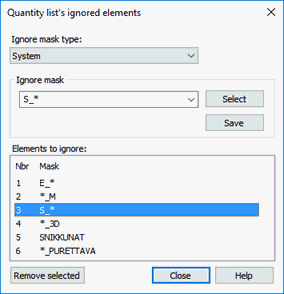
You can define a mask, which will be used to compare element's properties. All matches will be filtered. There are 5 different properties, which can be used to filter elements:
-
Attribute name
-
Attribute name and value
-
System
-
Symbol
-
Layer
Wildcard characters ? and * can be used within ignore masks. When ignoring elements by attribute name and value, ignore mask must be of the following syntax: "attribute name=value".
When counting quantities from the selected drawings, the lists are made to the opened drawing. The Show list bar symbols in drawing function does not work from this kind of a list.