With the functions in the  (Sector functions (beam functions)) menu in the Symbols window, you can position symbols and
define the symbol sector, which is visible in the drawing and when positioning
the symbol. Typically, the sector describes, for example, the operation area
of a motion detector.
(Sector functions (beam functions)) menu in the Symbols window, you can position symbols and
define the symbol sector, which is visible in the drawing and when positioning
the symbol. Typically, the sector describes, for example, the operation area
of a motion detector.
The following functions are available:
-
Insert symbol in operating sector
 Show/hide procedure
Do the following:
-
Select a symbol in the Symbols window. Alternatively, indicate the symbol in the drawing by first pressing Enter.
The Sector data dialog opens.
-
Select the type of sector you want to create: a traditional sector (angle of 1–359), a full circle sector, a full circle sector with polygon inside it, or a free form sector.
-
Define the sector data: angle, radius, and the start point and direction of the drawing.
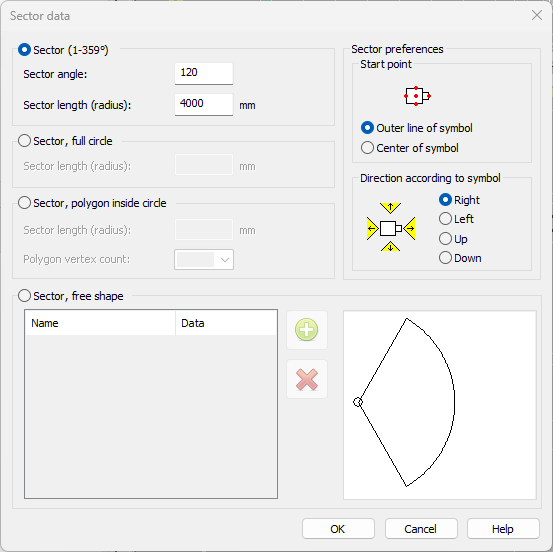
The start point is in the center or edge according to the outer lines of the symbol. The defined sector direction is its direction in respect of the symbol position.
-
Click OK.
-
Insert the symbol (also sector can be seen) to the desired position and angle.
The sector will be drawn to the marking system layer according to the symbol system. Also the color and line type will be defined according to the marking system settings.
-
- Change operating sector data of symbols
-
Select the symbols for which you want to change the sector data. The Sector data dialog opens. The sector data of the first selected symbol is shown as the default data in the dialog box.
-
Define the sector data: angle, radius, and the start point and direction of the drawing.
The start point is in the center or edge according to the outer lines of the symbol. The defined sector direction is its direction in respect of the symbol position.
-
Click OK. The function draws the sectors again, and the changed data becomes active.
-
Re-draw operating sectors of all symbols – Redraw all operating sectors according to the data saved in symbols. The sectors may have been deleted from the drawing, or they may have been left in their position when moving the symbol. This function is used to move them to their correct places.
-
Delete operating sectors of all symbols – Delete all operating sectors from the drawing. Symbol operating sector data will not be deleted. The sectors can be drawn again with the Redraw operation sectors of all symbols function.
-
Mirror symbol to insert horizontally – Mirror the symbol to be inserted horizontally. This function is enabled only when inserting a symbol.
Show/hide procedure
The sector will be drawn to the marking system layer according to the symbol system. Also the color and line type will be defined according to the marking system settings.