Define folder structure for your own symbols

|
Cabinet Layout tab > Devices group > Symbols |
On the  (User's symbols) tab in the Symbols window, you can define the folder structure yourself, i.e. you can create folders and subfolders and name and rename them as you like.
-
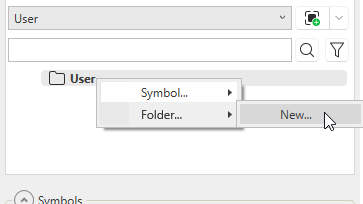
Create folders by right-clicking the empty space below the search field or the folder below which you want to create the new folder, and select Folder > New. Then enter the name for the new folder.
-
Rename folders by right-clicking the desired folder and selecting Folder > Rename. Then enter the new name.
-
Remove folders by right-clicking the desired folder and selecting Folder > Remove. Then confirm the removal by clicking Yes.
You can also create new folders in the symbol saving function (see Save your own symbols).