Rules for extracting attribute fragments
You must use named capture groups in the form (?<abbreviation>pattern) to extract parts of structured strings, for example to split pipeline tags into multiple attributes, each containing specific information, and saving them to dedicated attribute(s) whose abbreviation is comprised between <>.
See also Attribute settings.
For more information on regular expressions, see Regular expressions (regex) – common operators.
Example:
-
Navigate to the project to edit, and then click Project Admin in the main menu. The project administration view opens.
-
Click Model Configuration. The model configuration view opens.
-
Click Attribute Settings.
-
Click Split.
-
In the Rules for Extracting Attribute Fragments section, click Add New.
-
In Source Attribute field, select "Pipeline Id".
-
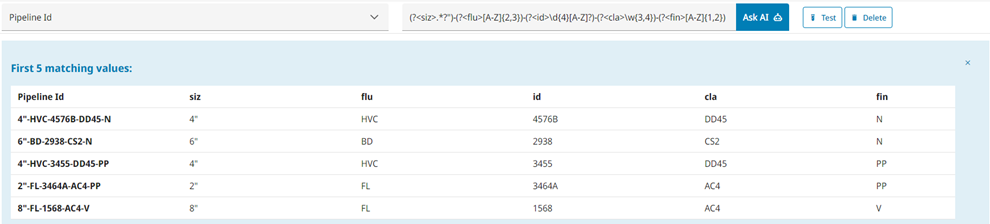
In Pattern field, enter the following regex to extract values that matches the first pattern from the attribute, e.g. "Pipeline Id" and stores it into attributes called "siz", "flu", "id", "cla", and "fin".
(?<siz>.*?")-(?<flu>[A-Z]{2,3})-(?<id>\d{4}[A-Z]?)-(?<cla>\w{3,4})-(?<fin>[A-Z]{1,2})
-
Click Test to display the first matching values.