Settings
File > Plot Setup > Settings
Define the settings for plotting.
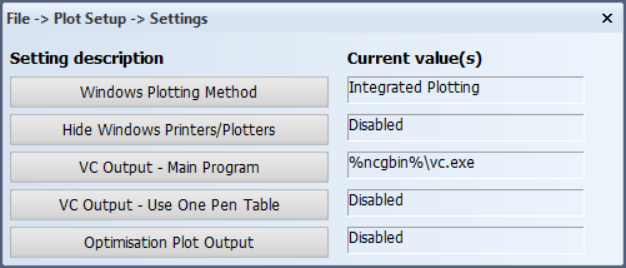
Windows plotting method
With this setting you can choose which plotting method is used. Both methods can use either a Windows device or a locally installed Windows plotter driver. The Windows Plotting Method setting does not apply only to the norms configuration or projects, but it applies Hull application wide.
-
Legacy plotting – The plot output is created in several steps in the background.
-
Integrated plotting – This is used as the default Windows plotting method. The method is faster and more straightforward. It uses the model shown in the Hull application directly, for example, a drawing, a sheet or a sketch.
Hide Windows printers/plotters
By default, installed Windows devices are available when plotting. This can be disabled using this setting. Defined Hull plotters are always available.
VC output - main program
Specify another location and program name for ViewCompanion. The ViewCompanion main program vc.exe is by default located in the directory %ncgbin%. The ViewCompanion program is used for several plot output formats. The output formats generated by ViewCompanion are indicated by a "VC" prefix, and include the following: VC-EMF, VC-WMF, VC-DWF, VC-TIFF, VC-BMP, VC-CALS, VC-DXF, VC-PDF.
- This setting is applicable only for plotter definitions (created in CADMATIC Hull) that use connection type "Share/Direct connection" or "Network (IP/Host)".
- This setting is not specific for the active project but will be used for all projects for the same Hull version.
- Make sure that all workstations that should be able to generate any of the output formats mentioned above can use the changed location/name.
- Example: In case ViewCompanion is separately installed on a local system the setting value would be: "%programfiles%\ViewCompanion standard\viewcompanion.exe".
Note that if the setting contains an environment variable (such as %programfiles%), the entire value must be enclosed by double quotes.
VC output - use one pen table
By default pen colours, thicknesses and replacements are defined by the configurations set by the user in the plot menu. With this setting you can enable/disable the use of one pen table for all ViewCompanion output formats. The ViewCompanion program is used for several plot output formats. The output formats generated by ViewCompanion are indicated by a "VC" prefix, and include the following: VC-EMF, VC-WMF, VC-DWF, VC-TIFF, VC-BMP, VC-CALS, VC-DXF, VC-PDF.
- The pen table file %ncgnorms%\vc_pentable.vpt can be edited in ViewCompanion.
Optimisation plot output
Enable/disable optimisation of plot output. Optimisation can be used to improve plot data generation. This setting affects all projects in the current Hull version. The optimisation features are the following:
- Remove overlapping vectors.
- Remove overlapping arcs.
- Transform collinear vectors into one single vector.
- Transform concentric arcs into one single arc.
- Transform segments representing an approximated arc into the proper arc item.