Configuring the connection to the nesting SQL database
The exchange of data takes place via ODBC (Microsoft's Open Database Connectivity). To configure such a connection, there are four settings in the Import/Export > N-C Nesting > Nesting SQL Database -> Connection Settings function in the System Management application:
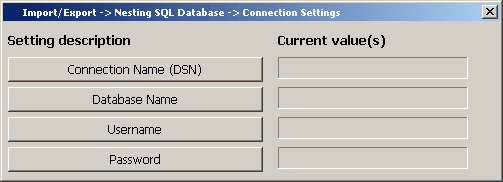
After setting these four values, you can setup the connection with the "Setup" function in the Import/Export > Nesting SQL Database menu.
Now one of four things can happen:
- The connection is already available.
- The connection is not available and the user is prompted to create it using the standard Windows configuration panel, see for more information Appendix A: Creating an ODBC connection (DSN).
- The connection is not available and is automatically created using a configuration file.
- An error occurred.
If the user creates the connection (2), the connection information is written to a configuration file in the %ncghelps%\odbc directory that can be subsequently used to create the connection automatically (3) (on other machines). This means that the connection has to be configured once in the System Management Application on some machine and then, if the import function is started from 3D-Contek by some user on another machine, the configuration file thus created is read and the ODBC connection is created automatically.
To modify an existing DSN, remove the corresponding configuration file in the %ncghelps%\odbc.