Saving views and models
To save the view or model currently open in Hull Viewer, select File > Save or File > Save As > [file format], or click the  button. If the currently open file is of the .3hm format and no changes have been made to it, only Save As is available.
The Save As dialog

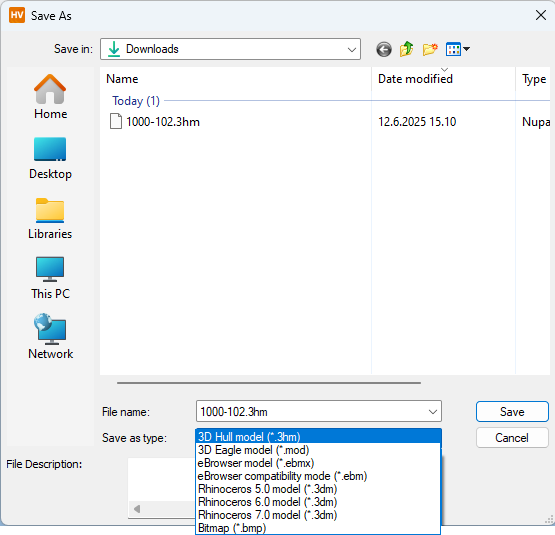
Change the save location, file name, and file format as desired.
The default save format is .3hm (Hull Viewer Model).
Supported file formats
Note: Paragraphs marked with an asterisk (*) only apply to Hull Viewer in combination with CADMATIC Hull. These functions are not available in the standalone version which is also referred to as Work Preparation Manager (WPM).
2D formats
The following 2D formats are available for saving the current contents of the Hull Viewer screen:
- Bitmap (.bmp)
- Portable Document Format (.pdf)
3D formats
The following 3D formats are available for saving the currently loaded parts as a model:
-
Hull Model (.mod), extrusions only (formerly known as Eagle model)
- The file will contain the attribute fields as defined in System Management > Extra > Hull Viewer > Attributes.
-
3D Hull Model (.3hm), Hull construction only
- The file name suggested by the system is a combination of the project number (object number) and the active block number.
- All the loaded geometry, the associated logistical data, and the project settings (work breakdown structure) are stored.
- A single 3D Hull Model file can contain multiple blocks, but only the active block can be modified and be synchronized with the CADMATIC Hull database.
- * Those logistical fields that have the Visible property set to No are not saved to the 3D Hull Model file (to minimize loading time). Use the Logistics > Logistical Database Layout function in System Management to change the Visible property of the fields that you want to be saved to Yes.
-
* eBrowser Model (.ebmx), compatible with CADMATIC eBrowser version 2021T2 and later
- * A 3D Dump file (.3dd) is automatically created with the model file.
- * To save the work breakdown structure into the model file, all WBD levels must be present as model attributes. Model attributes can be defined in System Management > Extra > Hull Viewer > Attributes.
-
* eBrowser Compatibility Mode (.ebm), compatible with pre-2021T2 CADMATIC eBrowser versions
-
Rhinoceros 5.0 Model (.3dm)
-
Rhinoceros 6.0 Model (.3dm)
-
Rhinoceros 7.0 Model (.3dm)
File description
You can use the File Description box at the bottom of the Save As dialog for notes and information about the contents of the file that you are saving.
- The description is saved with the model, and it cannot be modified later.
- A maximum of 512 characters is allowed in the description.
You can view the file description by selecting File > File info in Hull Viewer.