Curve list
Select Edit > Curve list to see all the curves in the model in a list.

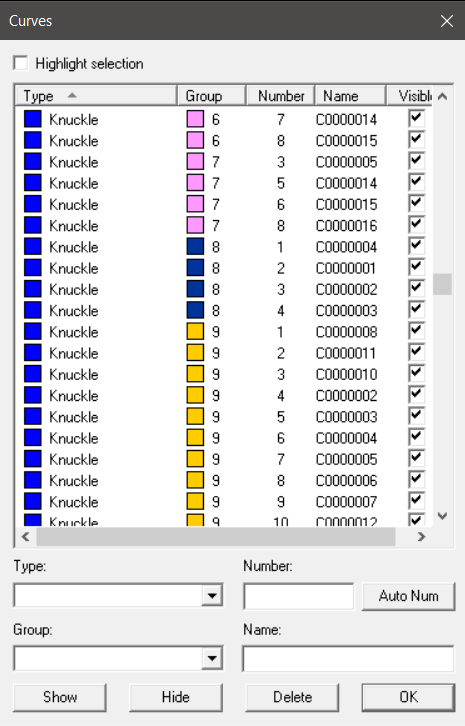
To highlight the selected curves in the graphical window, click Show. Note that when you select a large number of curves, the highlighting may decrease performance.
To hide and show again the selected curves, you can clear and reselect the check boxes next to them, or click the Show and Hide buttons.
You can modify the curve type, curve number, group number, and curve name of the selected curve. Select the curve to modify, and enter the new values to the Type, Number, Group and Name fields, respectively.
-
This system checks the validity of the curve numbers. When a combination curve type/number is not unique within a group the number appears in red.
-
Click Auto Num button to automatically generate unique numbers.
To delete curves, select them and click Delete. Note that the curves are not actually deleted until you click OK.
To save your changes and close the dialog, click OK. To close the dialog without saving any changes, click the cross at the top right corner.