Undoing plate modifications
To undo the last plate modification, select Construction > Plates > Modify > Undo.
Select the plate that has the modification you want to undo.
A message window opens and asks you if you want to undo the last plate modification. Click Yes to undo the modification, and No to cancel it.
The plate will return to the state it was in before the last modification.
Note: The Undo function is limited to the last modification of the last modified plate. Only changes to plate relations can be undone with this function. It does not cover changing plate properties, moving plate, or changing plane, for example.
If you are modifying plate relations and the Modify a plate contour dialog is open, you can click Undo/Remove to undo the last modification.
Undoing seam removals in plates split by seams
Plates which have soft seams splitting the plate into two or more pieces are called panels. The pieces resulting from the splitting are called plate parts. In addition to soft seams, plates can also be split by slots/splitters or holes, or a combination of these.
The panel remains a single entity in the Hull construction database, but the plate parts have their own logistical record, and can therefore have different thicknesses and material types. The thickness and material type can be changed individually for each plate part. Shrinkage compensation is applied on the complete panel.
If a seam with a bevel is removed from a panel, and the removal is undone with the Undo or Undo Removal function, the bevels at the removed seam will be restored with the seam. However, other bevels which were removed with the seam removal will not be restored. See the example below. To get these bevels back, you must run Bevel Generator. Note that Bevel Generator only restores automatically placed bevels; it does not restore manually placed bevels.
 Show/hide example
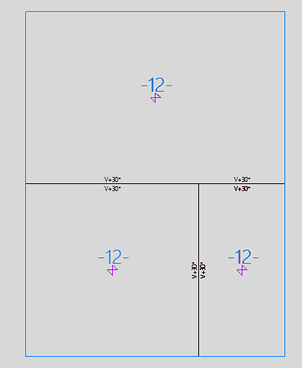
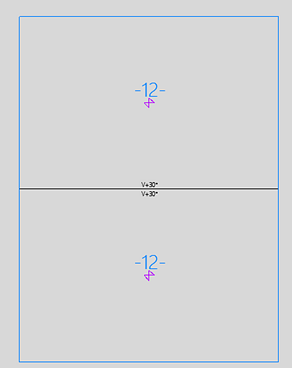
The first image shows a panel with 3 plate parts. When the vertical seam between the two lower plate parts is removed, the two plate parts are combined into one. The system removes two bevels from the horizontal seam, and repositons the remaining two bevels at that seam. The result is shown in the second image.
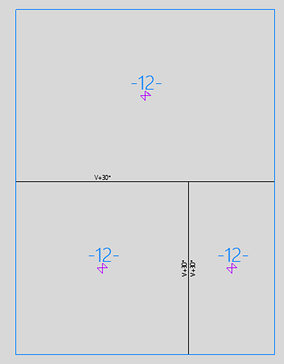
If the user performs an undo removal action, the system restores the removed vertical seam and the two bevels at this seam. The bevels that the system removed from the horizontal seam cannot be restored. The system also removes the lower bevel at the horizontal seam because a bevel can only belong to one plate part. The result is shown in the third image.
If the Bevel Repair tool is run with the Delete bevels that cannot be repaired option in this situation, the upper bevel left on the horizontal seam will also be removed.
Running Bevel Generator will get all the bevels back and restore the situation shown in the first image.