|
label 1
Calc_Angle = 'Yes'
exit
label 3
Varstr=''
exit
LABEL 4
VarStr = 'R1 0.3'
Quest[1] = 'Angle ratio'
EXIT
|
In this case the recalculation of the angle is wanted.
To define a variable icon the question is necessarily.
|
|
label 6
enable12[1]='0'
enable12[2]='2'
enable12[3]='3'
enable12[4]='9'
enable12[5]='28'
enable12[6]='11'
default34='0'
exit
label 11
{
points posann
if endname='A' : exit
pen 1
move p0
if endname='J' then
{
posann=(50,40,0)
dimension
E=E60,w=50,50,C=40,j=m,v=posann,<=1,20,>=1,20,T='X';
}
if endname='H' then
{
posann=(50,40,0)
dimension
E=w60,w=50,150,C=40,j=m,v=posann,<=1,20,>=1,20,T='X';
}
}
exit
label 14
if endname='J' : Varstr = 'R1 0.3'
if endname='H' : Varstr = 'R1 0.3'
if endname='A' : Varstr = 'R1 0'
exit
|
If this type is used as first end-type, in body view, the default of the flange endtype is 0.
If this type is used as third end-type, in flange view, only type 0,2,3,9,28 and 11 are allowed to choose.
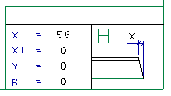
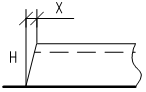
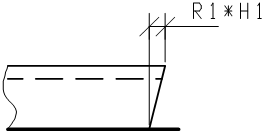
In label 11 the annotation for the profile sketch is defined. The start position for the dimension is the base point from the profile. The defaults from label 4 are important for the picture on the sketch.
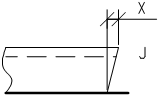
To make a difference in presentation between a negative, square and positive angle the information in label 14 will overrule label 4. The endname (J,H,A) must be defined in the R line of the type file.
|
 Type macro