Deck 3500 Above Base
Start situation – Deck 3500 Above Base
Now you will create "Deck 3500 above base".
Deck 3500 is a deck with two different thicknesses and therefore it must be created from two separate plates:
- A deck with thickness 10 mm;
- A deck with thickness 12 mm.
Overview of actions:
- Open drawing top view "108-3500"
- Place standard text "Deck 3500 above base" above view
- Create plate "Deck 3500" with thickness 10 mm
- Create plate "Deck 3500" with thickness 12 mm but without cutout
End situation – Deck 3500 Above Base
Additional description of actions:
- Open drawing top view "108-3500"
Opening drawing top view "108-3500" is similar to opening drawing frame view "108-27", but you have to select "Top" for the type of view and "108-3500" for the drawing name within panel Open drawing.
- Place standard text "Deck 3500 above base" above view
Place standard text "Deck 3500 above base" above view is similar to place standard text "Deck 6200 above base" above view. Please select from panel Text the text "Deck 3500 above base".
- Create plate "Deck 3500" with thickness 10 mm
The creation of plate "Deck 3500" with thickness 10 mm is similar to the creation of plate "Deck 6200" with the following plate boundaries:
Option
Value
'Min. Length'
22 + 9 ( 9: assumed thickness of transverse bulkhead )
Indicate the hull line
'Max. Length'
26 - 50
'Min. Breadth'
3920
- Create plate "Deck 3500" with thickness 12 mm but without cutout
Now you will create the second plate "Deck 3500" with thickness 12 mm but without cutout.
If you take a close look at the sheet, you will detect a little jut in the contour of this plate. This jut is located at the upper left corner of the plate:
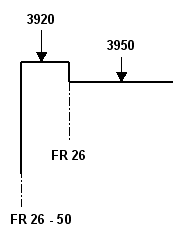
Due to the jut in the plate contour, the creation of this plate will be more complicated than the previous rectangular plate.
Let's create the second plate "Deck 3500" by selecting the icon Plates in View on the Plates tab:


After selecting this function, you enter the values for Thickness and Thickness direction in panel Plates in View.
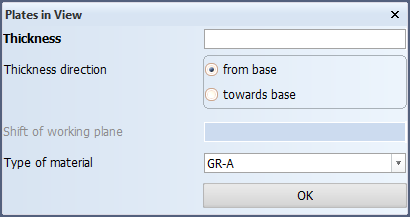
The second plate "Deck 3500" has a thickness of 12 mm and the thickness direction is from base. After clicking the OK button, you have to specify the plate boundaries (relations) by means of the panel Define a plate contour.
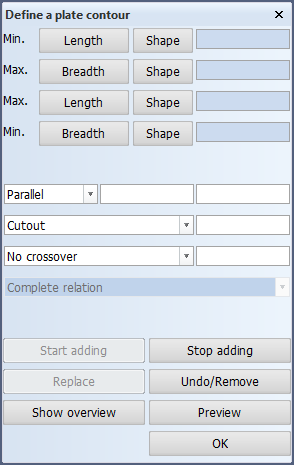
Tip: As a reminder, please be aware of the rule: "The plate boundaries must be defined counterclockwise!"
The boundaries of plate "Deck 3500" with thickness 12 mm will be defined by using a reference to another plate as well as minimum and maximum boundary values:
- Start with the aft boundary of the new plate by directly indicating the aft plate "Deck 3500" with thickness 10 mm, by clicking near the right side of the line (the fore ship side). When direction indicating a line such as in this situation, you don't have to use the Min. Length button;
- Applying the rule that plate boundaries must be described counterclockwise, the next boundary of the plate is the hull line. Thus indicate the hull line;
- The next relation of the plate is the forward boundary located at frame 31. Select the Max. Length button and enter 31 as value in the entry field;
- The next boundary of the plate is a line with a parallel distance of 3950 from the centerline. Select the Min. Breadth button and enter 3950 as value in the entry field;
Now you have to define the little jut:
- The next boundary of the plate is located at frame 26, where you have a new maximum length, because there is no plate material to the right of frame 26. Select the Max. Length button and the previous value will disappear. Now you can enter 26 as new value in the entry field;
- The last boundary of the plate is a line with a parallel distance of 3920 from the centerline. Select the Min. Breadth button and enter 3920 as new value in the entry field.
After defining all relations of plate "Deck 3500" you can preview the result by clicking the Preview button. When the plate looks correct, it can be created by clicking the OK button.
Note: The creation of this plate illustrates the general rule, that a plate can contain several minimum and maximum lengths!