Design area
A design area provides the per-user, per-project site infrastructure required to run CADMATIC design applications in the context of a project. A design area stores work copies of project data. Each design area has its own area ID, taken from the range 1–1018 or 2048–9999, so the maximum number of different design areas is 8,970.
Physically, a design area is a directory in your workspace, and you can have several design areas in your workspace. A design area defines the limits of a designer's rights to modify objects. The project space covers all design areas (all model objects) in a project. View limits can be set smaller than the design area limits.
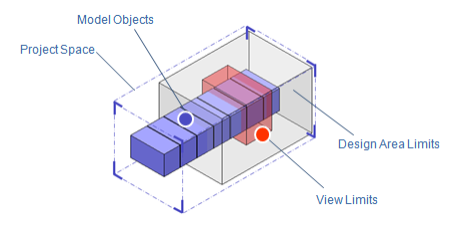
When you create new objects such as pumps and pipes or modify existing objects, these changes are initially visible only to you in the design area where you are working. Only after you save and explicitly request Plant Modeller to update the project database do these new and modified objects appear in the project database.
Plant Modeller periodically checks for updates in the project database and updates the data in the design area accordingly.
Concurrent design is implemented so that, to modify an object, it must be editable (checked out) in your current design area. New objects that you create are automatically editable until you give away this permission by checking in the objects. Objects that others have created (or those you have previously checked in) need to be checked out for editing into your current design area. This guarantees that only one designer at a time can modify certain data.
To create a design area, select CADMATIC desktop > Object > Create Area For > [application name].