Drafting Styles
In the Project Environment dialog, Document Production > Drafting Styles defines drafting styles for the Piping Isometrics & Spools application as well as for Cable Router section views. A drafting style provides the default settings for 2D objects (texts, lines, dimensions, and so on) in drawing views. If you change the settings of an object when annotating a page or view, the modified settings will become the default settings.
Create the required drafting styles in the library database and approve them for use in the projects.
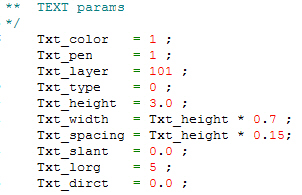
A drafting style sets up these drawing attributes for 2D annotations:
- Txt_color – Default text color. The value is the index number of the color defined in the Colors configuration. The first index number is 0 (black), and numbers grow left to right, row by row.
- Txt_pen – Text lineweight. The value is the index number of the lineweight defined in the Lineweights configuration.
- Txt_layer – Layer ID for texts when drawings are exported. The value is the index number (0–256) of the layer defined in the Drawing export configuration.
- Txt_type – Text type. The value is a small integer used to derive the name of the text macro in the 2D symbol library. The symbol name is TEXTnn, where nn is Type as a 2-digit integer. The various text symbols implement different features, such as enclosing boxes, reference lines, run-time settable text, etc.
- Txt_height – Text height.
- Txt_width – Text width.
- Txt_spacing – Text spacing.
- Txt_slant – Text slanting in degrees. The value specifies the angle of the "up" vector: 0 degrees means normal upright text, and 15 degrees produces italics.
- Txt_lorg – Text origin. The value is an integer that specifies what part of the text block is the local origin. There are nine valid origin points, and they form the following layout so that, for example, Txt_lorg = 5; centers the text:
1 2 3
4 5 6
7 8 9 - Txt_dirct – Text direction in degrees. 0 degrees is the horizontal direction for left-to-right text, and 90 degrees writes upwards.
Example: