Holes
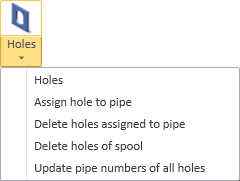
On the Tools tab, in the Manage group, the Holes menu contains the following tools.
Note: The Holes menu includes different commands for Hull Classic and Hull COS.
Holes
Select Tools tab > Manage group > Holes > Holes to manage hole requests in the Hole Manager tool.
Assign hole to pipe
Note: This command is not available when using Outfitting with Hull COS.
Select Tools tab > Manage group > Holes > Assign hole to pipe to select a hole and assign it to a pipe.
When a hole is assigned to a pipe, the hole information—for example, in the hole list—includes the object ID number of the pipe it is assigned to.
Delete holes assigned to pipe
Note: This command is not available when using Outfitting with Hull COS.
Select Tools tab > Manage group > Holes > Delete holes assigned to pipe to select a pipe and delete all holes assigned to it.
Delete holes of spool
Note: This command is not available when using Outfitting with Hull COS.
Select Tools tab > Manage group > Holes > Delete holes of spool to select a pipe and delete holes assigned to the pipe spool.
Hole information defines pipe numbers as follows:
<pipelinename>_<spoolnumber>_<username>
If the selected pipe has a spool number that matches the spool number in the hole, the hole is deleted.
Update pipe numbers of all holes
Note: This command is not available when using Outfitting with Hull COS.
Select Tools tab > Manage group > Holes > Update pipe numbers of all holes to update the pipe numbers of all holes assigned to a pipe.
Hole information defines pipe numbers as follows:
<pipelinename>_<spoolnumber>_<username>
If the pipeline name and spool number are updated, but username remains the same (it never changes after creation), the hole information shows who assigned the hole to the pipe or created the penetration.