Manual update in offline mode
An offline satellite site is updated by transferring update files (*.upd) between the satellite site and the parent site. These files are compressed and contain only changed data, so they are relatively small and can be sent as email attachments.
To update an offline satellite:
-
At the satellite site:
Use Manage COS Servers > Replication > Update With Master > Update to create an update file named 'Update_from_<replica>.upd', and transfer the file to the main site.
-
At the main site:
Use Manage COS Servers > Replication > Receive Offline Update File > From Replica to read the update file, create a replica update file named 'Update_to_<replica>.upd', and transfer the file back to the satellite site.
-
At the satellite site:
Use Manage COS Servers > Replication > Receive Offline Update File > From Master to read the update file.
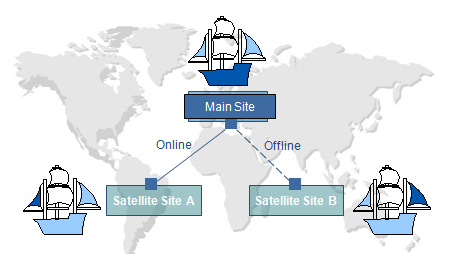
In the picture below:
-
Satellite Site A has an online connection to Main Site and sends/receives updates according to the update frequency set at the replica server.
-
Satellite Site B is offline and cannot see work done at Site A or Main Site. Likewise, those sites have no knowledge of Site B's current state. To synchronize, Site B sends an update to Main Site and it sends an update back to Site B.
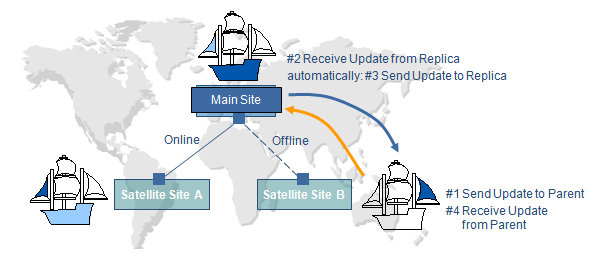
The update procedure is always initiated by the replica server; you cannot send an update from the master server without first receiving an update file from the replica. If update files are lost, they can be recreated as described in Recovering a project.
In the picture below:
-
Main Site and Satellite Site B have exchanged updates, and all three sites can see the current project state.