Replication of COS files
The COS system uses file sets to replicate documents and Work Request attachments. The metadata of these file sets is stored in COS objects, where each COS object manages a file set.
By default, COS objects are replicated during normal COS object replication, so information about the existence of file sets and their contents is distributed through the manager objects. The actual files in the file sets are replicated as described below.
In environments with multiple levels of replica servers:
-
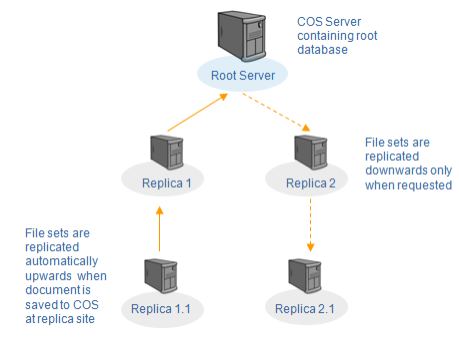
Managed file sets are automatically uploaded to the root server, provided that server connections are online and replication is set to automatic.
-
Downstream replication occurs only on request.
For example, in the picture below, a COS network uses online connections and automatic replication. When the manager object of a document (or other file set) is updated on Replica Server 1.1, both the manager COS object and the files are uploaded to Replica Server 1, and then to the root server.
From the root server, only the manager objects are updated downstream to Replica Server 2 and Replica Server 2.1. The knowledge of the files is transferred, but the files themselves are downloaded only upon request.
See also the save and request commands in Document browser.
Automatic online
In online replication, replication can be scheduled or requested.
Scheduled replication is controlled in Manage COS Servers > [server] > Replication > Update Settings.
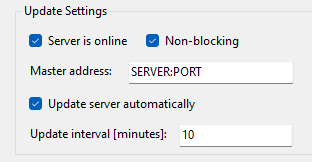
If the replica server is set to automatically update the master server, all COS objects are updated according to the specified frequency. File set uploads occur at the same interval but have a maximum duration to limit network usage. File transfers do not lock the COS server from applications and users like replication does.
If the upload cannot finish within the time limit, it resumes at the next replication time.
If uploads remain incomplete after scheduled sessions, a special upload task runs nightly after backup. In this mode, the replica server uploads files continuously until all file sets managed at the site are uploaded.
Upload problems
If a replica server has an online connection but cannot upload files fast enough, clients receive an error message indicating the upload rate is insufficient.
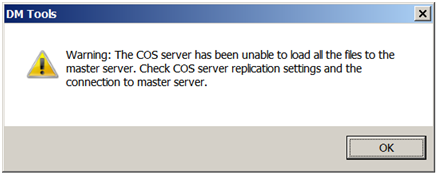
If the message appears, check Manage COS Servers > [server] > Replication > Update Settings to ensure automatic updates are enabled and the update interval is not too long (for example, several hours).
If automatic updates are enabled and the interval is short, the issue may be due to:
-
Master server downtime
-
Network connection failure
-
Insufficient bandwidth
For more details, see Automatic update for online replica.
Manual online
To request an immediate update, use Manage COS Servers > [server] > Replication > Update With Master > Update. This uploads all files regardless of duration.
For more details, see Manual update in online mode.
Offline
If the COS server is set to offline in Manage COS Servers > [server] > Replication > Update Settings, file sets and COS database objects are updated together.
For more details, see Manual update in offline mode.