Dish

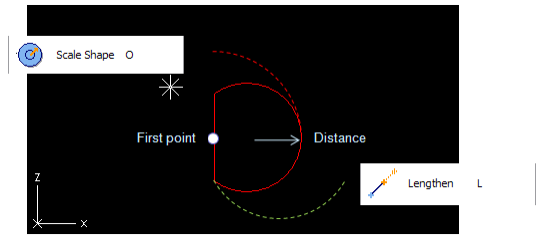
A dish is defined by two end points. The first point locates at the cut end of the dish and the second one is defined with distance value from the first one. The direction is along the positive x-axis. The radius for the dish can be set so that either of the end points remain in place.
During the Dish command (or afterward using command Edit > Primitive) select one of those two action points and change the radius using method:
-
Scale Shape for the first point, second point remains in place.
-
Lengthen for the second point, first point remains in place.
If you start the dish from a circular end point of another primitive using Refer (P), the radius and direction for the dish is copied from that end circle. If the end circle is parameterized, then the radius of the dish will also get that same parameterization.