Run
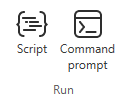
On the Tools tab, the Run group includes the following tools.
Script

Select Tools tab > Run group > Script to open a dialog for selecting a script file to be run.
You can use this to run a CADMATIC script file from %PMS_HOME%/opt/pm/EloTools/macro/, or you can run a custom script file created by your organization, if available.
For more information on executing scripts, see Executing scripts.
For information on installing a script development environment in Notepad++, see Script development environment.
Command prompt

Select Tools tab > Run group > Command prompt to open the Cadmatic Terminal command-prompt window for running scripts from the command line.