Standard Component example (Lateral)
In this example you are going to create a standard component of type "Lateral". It will be included in a Component Class called "Branches". The name of the component class may vary, but the type is always "Branches" as this is fixed in the system. Only one component class of type "Branches" can exist, so it is recommended to use this class for all branches.
Functional Codes are used to describe the purpose of the component and the list of the codes creates the hierarchies for the specifications you use later to bring the component into use in the project.
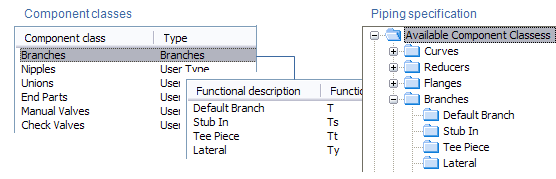
In the picture below, the "Branches" component class has the functional codes "Default Branch", "Stub In", "Tee Piece" and "Lateral", which are then listed in the corresponding "Branches" folder of the Piping Specification.
The procedure for creating a standard component:
-
Add functional code in Component Class "Branches".
-
Create geometric model (GDL) (GDL in Component Modeller).
-
Create catalog part (and part sizes).
-
Update piping specification and add the component to the spec.