Desktop with outfitting licensing
CADMATIC Outfitting allows designers to have different types of Plant Modeller areas. In the licensing system, the different roles are represented with the following suites and seats:
-
CADMATIC Outfitting Detail Design Suite
-
CADMATIC Outfitting Basic Design Suite
-
CADMATIC Outfitting 3D Cable Design Seat
-
CADMATIC Outfitting Plant Modeller
In the CADMATIC desktop, when a user is creating a Plant Modeller area, the role the user selects defines the license that will be used.
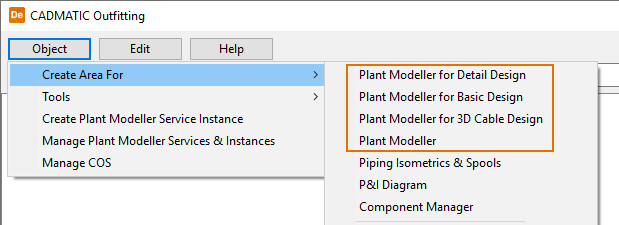
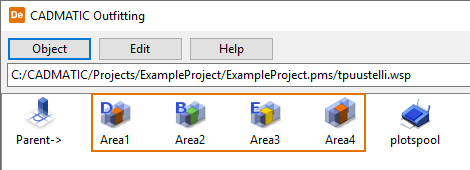
Even if the role is different, they are still Plant Modeller areas, and Plant Modeller requires the name of each area to be unique.
The role of an existing Plant Modeller area can easily be changed:
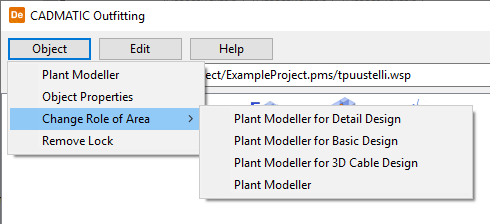
Note: A seat license is reserved from the license server depending on the current role of the Plant Modeller area.
Technically, the contents of the suite and seat licenses are according to the following matrix. That is, launching any main module gives the permission to use the functionality marked with an x in the column below that particular suite and seat license:
| Main license | Plant Modeller | Plant Modeller for Detail Design | Plant Modeller for Basic Design | Plant Modeller for Electrical Design |
|---|---|---|---|---|
| Plant Modeller (excluding pipe and duct routing) | x | x | x | x |
| Pipe routing | x | x | x | |
| Duct routing | x | x | x | |
| Cable Router | x | x | ||
| Duct Spools | x | |||
| Support Designer | x | x | ||
| Integration | x | x | x |
Commercially, the suites and seats include additionally following licenses:
-
Outfitting Basic Design suite contains P&ID license.
-
Outfitting Detail Design suite contains Piping Isometrics & Spools license.
-
All three suites and seat contain 2D and 3D eXchanger licenses for AutoCAD and a sufficient number of CoDesigner licenses.
-
These additional licenses (P&ID, Piping Isometrics & Spools, 2D and 3D eXchanger for AutoCAD and CoDesigner) which are sold in new suites and seat are exactly similar floating licenses as they have been before.
For more information on licensing, see the CADMATIC License Server manual in docs.cadmatic.com.