Drafting
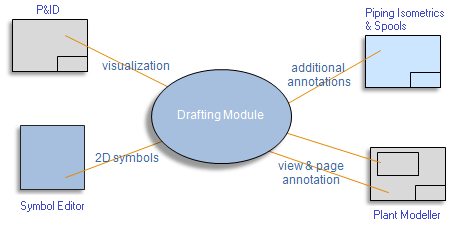
The CADMATIC Plant/Outfitting applications use a common 2D drafting environment, where the core functionality is shared but the user interface varies between applications. For example, Plant Modeller uses view coordinates for view-specific 2D annotations and 3D digitizing for locating points, whereas P&ID and Piping Isometrics & Spools use sheet coordinates and 2D digitizing.
Drafting in P&ID
P&ID users can annotate diagram drawings using 2D drafting tools. The application also uses 2D drafting for all other visualization: every connection line, equipment, and armature is drawn using 2D drafting objects. 2D drafting represents the lowest level in the P&ID object hierarchy.
Drafting in Plant Modeller
Plant Modeller uses 2D drafting to annotate pages and views. 3D objects are drawn via the application's own 3D visualization engine, but texts, dimensions, manually drawn lines, part numbers, and object labels are created or at least visualized using 2D drafting. These 2D annotations can be imagined as a transparent presentation layer placed on top of the 3D view. A Plant Modeller drawing has one presentation layer for sheet annotations and a separate layer for each drawing view's annotations. Note that these presentation layers are an internal concept and not the same as the graphics layers exported to a drawing file.
Drafting in Piping Isometrics & Spools
Piping Isometrics & Spools uses its own visualization module to display isometric geometries and drawing-specific annotations such as dimensions, triangles, and coordinate labels. An isometric document can have one 2D annotation layer. Typical 2D annotations created with 2D drafting include detail views, text inserts, and manually filled data tables.
2D Database
2D drafting data is not stored in the same database as the application-specific data. Instead, it is stored in a 2D database called the 2D drawing. These 2D drawings reside in the design areas.
In the Project Environment dialog, all labels and 2D symbols used in the main applications are created in the library database. For example, the creation of '2D Symbol' objects uses the 2D drafting environment.


Ownership of 2D Drafting Objects
In CADMATIC, 2D drafting is rarely used as a standalone tool. Typically, 2D drawing objects are linked to other objects. In Plant Modeller drawings, most 2D objects are labels. In P&ID, all piperuns, armatures, and equipment are drawn using 2D drafting, but information about connections, systems, pipelines, and other object data is stored elsewhere.
Each 2D drawing object is linked to its host object via the object owner ID, which is an integer value. This ID can be used, for example, to find all the labels related to a specific P&ID object.