Projects
CADMATIC applications are operated in the context of a project. The data that describes a project is stored into two COS (CADMATIC Object Storage) databases: project and library. The first one contains data specific to the project and the latter one contains data that can be shared by several projects.
The actual design work takes place at a project site (master site or satellite site). A project site consists of a number of computers connected by a LAN. There is a COS server (master server or replica server) that hosts the project and library databases, and there is a shared directory that can be accessed by all the computers that participate in the project at this site.
In the picture below a master site is introduced. This site hosts the master project database. There can be only one master project database in a project; all the others are replicas (replica project databases) of this database.
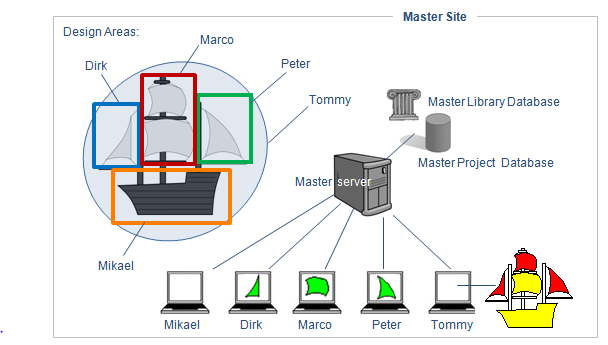
Typically, a designer can only see a portion of the whole project space in Plant Modeller. This portion is called a design area. In the picture above, only Tommy has the whole project space as his design area, meaning that he can see all the model objects of the project. Other designers can see only a portion of the whole project space, and they can see model objects in that area only.
To have rights to modify a model object, a designer must check out the object first. Only one designer can have the rights to modify an object at a time, and after the modifications the designer must check in the object back to the COS server which manages the project site.
In the picture above, Dirk, Marco and Peter have each checked out a sail to modify it. Using the command Object coloring style > By owner (Alt+5), each designer can see the ownership status of all the objects in their design area.
-
Green color indicates that the object is checked out by the designer.
-
Yellow color indicates that the object is owned by the site's COS server. The designer can check out the object.
-
Red color indicates that somebody else has checked out the object. The designer cannot check out the object.
Tommy has pressed Alt+5 to see the ownership status of the objects in the design area. The colors indicate that he could check out the hull and one of the sails, but three other sails are checked out by somebody else.
Distributed Project
In the picture below, we can see a distributed project: the project is maintained in several sites. The databases are replicated between the master server and replica servers in satellite sites. Every site has a COS server that hosts the site.
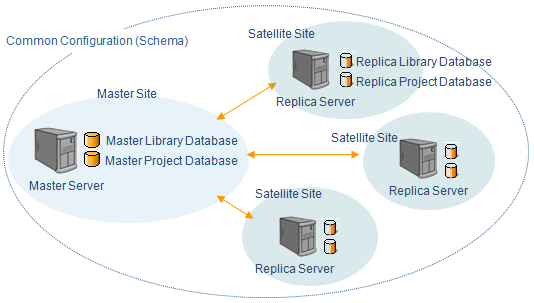
The database schema of the COS server defines the object types and their attributes, and it is part of the common (global) configuration, meaning that it is shared by all servers that use the configuration and all databases that these servers host. This means that all libraries and projects have the same attributes and type settings.
The ideal situation is that there is only one schema per organization. This helps administration, as changes need to be done in one place only.
Note: In a COS network, there can be only one schema.