Manage
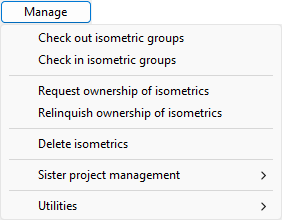
In the Piping Isometrics dialog, the Manage menu contains commands for managing the ownership of isometric objects and performing check-in/check-out transactions.
Check out isometric groups
You can check out isometric groups of the current System for modification. Only checked-out groups are listed in the Piping Isometrics dialog.
Check in isometric groups
You can check in isometric groups of the current System if they are in checked-out state.
Only one user at a time can check out objects; if an object is checked out to you, others cannot edit it.
Request ownership of isometrics
Requests the ownership of checked-in isometrics from the master server.
Relinquish ownership of isometrics
Relinquishes the ownership of checked-in isometrics from the replica server to the master server.
Delete isometrics
You can delete multiple isometric drawings and the related isometric groups of the current System. To delete drawings, they must be checked out to you.
Sister project management
You can unlink isometric groups that should no longer be linked to Sister Project Management. See Unlinking sister project objects.
Utilities
The following Utilities menu items can be used at any site:
-
Check out objects – Checks out the objects the user picks from the model.
-
Check in objects – Checks in the objects the user picks from the model.
The following Utilities menu items can only be used in distributed design, on the replica server of a satellite site:
-
Request ownership
-
Relinquish ownership
-
Request ownership of pipeline
-
Relinquish ownership of pipeline
That is, these commands are intended for managing the ownership of objects between master and replica servers. They might need to be used to enable document-related operations that are only possible at the owner site of the document. Also, some operations are faster if the objects are owned locally.
Once the ownership of an object has been passed to a replica, the only way the master can regain the ownership is by the replica passing it back to the master.
For more information on the ownership of model objects and groups, see Ownership.
For more information on the ownership of documents, see Document browser.