Collision tests with test cases
You can create test cases that look for collisions between the 3D objects in your design area and run these tests as needed.
Do the following:
-
On the Tools tab, in the Manage group, select Collisions > Collisions. The Collision Test Definitions dialog opens.
-
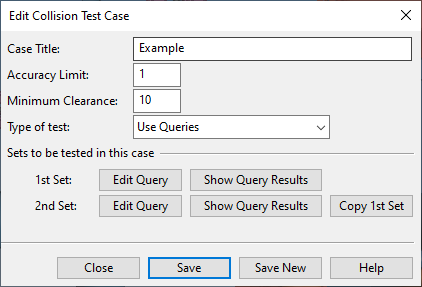
Select New > Collision Control Test Case. The Edit Collision Test Case dialog opens.
-
Specify the following:
-
Case Title – Enter a descriptive title for the case.
-
Accuracy Limit – Define the acceptable tolerance for collision detection as a numeric value (in base units.)
-
Minimum Clearance – Define the minimum clearance between components as a numeric value (in base units). The clearance value should usually be larger than zero; this allows using a coarser accuracy while still catching components that are too close to each other. Clearance is measured in all directions.
-
Type of test – Select what to test:
-
Use Queries – This option allows you to define two queries. Every object in the first set is tested against every object in the second set. See Use queries.
-
Check my recent changes – This option tests whether any objects collide with objects that you have recently modified. See Test my recent changes.
-
Check recent changes of others – This option tests whether objects that are checked out to you collide with objects that other users have recently modified. See Test recent changes of others.
-
Check my objects – This option tests whether any objects collide with objects that are checked out to you. See Test my objects.
-
-
-
Click Save and then Close.
-
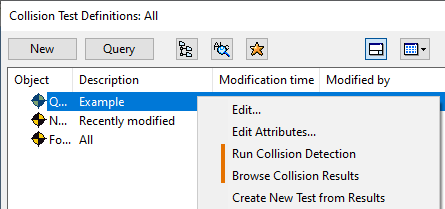
In the Collision Test Definitions dialog, you can now do the following:
-
Run the test case: right-click the test and select Run Collision Detection.
-
View the test results: right-click the test and select Browse Collision Results.
-