Intrinsic Script Functions
The tables below describe the syntax for the intrinsic script functions.
Arithmetic Functions
|
Function |
Returns |
Example |
|---|---|---|
|
SQRT(float_number) |
Square root of "float_number" |
SQRT(2.0) → 1.41… |
|
SIN(float_number) |
Sine of "float_number" |
SIN(45) → 0.707… |
|
ASIN(float_number) |
Arcsine of "float_number" |
ASIN(0.707…) → 45.0 |
|
EXP(float_number) |
"e" raised to the power of "float_number" Base "e" = 2.71828… |
EXP(1) → 2.718… |
|
LOG(float_number) |
Natural logarithm of "float_number". Base "e" = 2.71828… |
LOG(2.718…) → 1.0 |
|
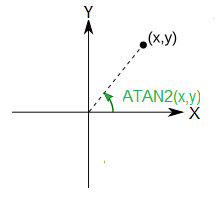
ATAN2(float_y,float_x) |
The angle between positive X axis and the "ray" from (0,0) to (x,y) in degrees
Important: Note the order of arguments! |
ATAN2(0.0,15.0) → 0.0 ATAN2(15.0,15.0) → 45.0 ATAN2(15.0,-15.0) → 135.0 ATAN2(0.0,-15.0) → 180.0 ATAN2(-15.0,-15.0) → -135.0 ATAN2(-15.0,15.0) → -45.0 |
Character String Functions
|
Function |
Returns |
Example |
|---|---|---|
|
SUBSTRING(s,n) |
Tail of string "s", starting from s[n] |
SUBSTRING("abc",1) → "bc" |
|
HEAD(s,n) |
First n characters of string "s" |
HEAD("abc",1) → "a" |
|
TAIL(s,n) |
Last n characters of string "s" |
TAIL("abc",1) → "c" |
|
SEARCH(s,patt) |
Tail of string "s", starting from the pattern |
SEARCH("abc","b") → "bc" |
|
STRINGTERM(s,patt) |
Head of string "s", ending before the pattern |
STRINGTERM("abc","b") → "a" |
|
TRANS(s,patt,patt2) |
Replace "patt" characters with "patt2" characters in string "s" "patt" and "patt2" can contain several characters, they are replaced one by one |
TRANS("abc","ab","bd") → "bdc" |
|
STRLEN(s) |
Number of characters in string "s" |
STRLEN("abc") → 3 |
|
APPEND(s,s2) |
Combine strings |
Obsolete; use string assignment s = s + s2 instead: s = "abc" s2 = "def" s = s + s2 s = "abcdef" |
Example
The code example below shows a typical use case of using intrinsic functions to manipulate character strings. The code is for an OK button handler of a multi-selectable list window user interface, and it uses string intrinsics for converting the bit string received from the user interface to the row indices of the selected rows.
 Show/hide example
ok_hlr(item, event_type, button_value)
{
    /*  Get the selections as a long string with "1" and "0" characters,
        indicating that the corresponding row in the list window was
        selected or was not selected.
    */
    selections = W_GET_WINDOW_ARG(ListW_h, W_LISTW_MSVALUE);

    /*  The length of the string is the same as the number
        of the rows in the list window */
    nr_list_win_rows = STRLEN(selections);

    for( i=0; i<nr_list_win_rows; i=i+1; ){
        /* Get the i'th character in the string */
        row_selected = HEAD( SUBSTRING(selections,i), 1);

        if( row_selected == "1" ){
            U_MESSAGE("Row #"+ITOASCII(i)+" was selected.");
        }
        else{
            /* character == "0" */
            U_MESSAGE("Row #"+ITOASCII(i)+" was not selected.");
        }
    }
    return(99); /* 99 to terminate the tool */
}
Miscellaneous Functions
|
Function |
Returns |
|---|---|
|
Based on the argument's data type, the logical true (int 1) or false (int 0) |
|
|
Based on the argument's data type, the logical true (int 1) or false (int 0) |
|
|
Based on the argument's data type, the logical true (int 1) or false (int 0) |
|
|
Starts the script debugger |