Insert an instrumentation symbol
Next, you learn how to insert a level indicator with control and alarm functions.
Do the following:
-
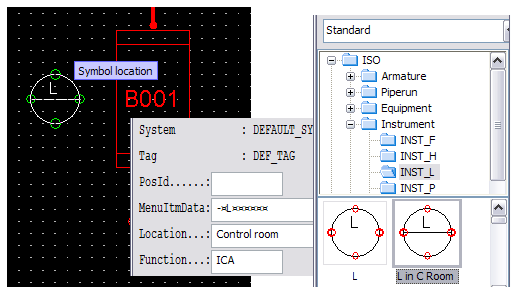
Select Templates > ISO > Instrument > INST_L.
-
Double-click L in C Room. This is a basic level instrument to be located in the control room.
-
Place the symbol on the left side of the vessel.
-
In the Edit Equipment Data dialog, for Function, enter ICA as the value.
-
Click OK.
-
Press Esc to exit the inserting mode.
You have now inserted a level indicator symbol on the drawing.
Important: There is a difference between ISO/DIN standard based instruments and CADMATIC instruments. ISO and DIN instruments have a unique database table for each instrument type while CADMATIC instruments have the same database table. Thus, you cannot use Change Object command for ISO/DIN instruments to change the type from L to T because of the different kind of a database.