Route instrument lines
You have now inserted an instrument. The next step is to route some instrument lines. Instrument lines are analogous to pipe runs in many respects. The routing mechanism is similar and instrument lines also always belong to a group object: the instrument tag (pipeline). The line is part of some system via the instrument tag. The default instrument tag is DEFAULT_TAG and it belongs to the DEFAULT_SYSTEM.
Do the following:
-
Select Templates > ISO > Iline > ILINES.
-
Double-click Iline.
-
Move the cursor near the upper part of the instrumentation symbol.
-
Press P to connect the line to the symbol.
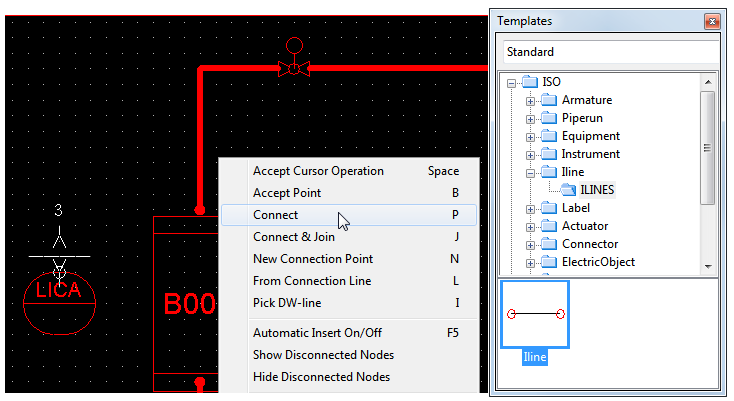
-
Route the vertical and horizontal segments of the instrument line.
-
Move the cursor on the upper quadrant of the valve actuator above the vessel.
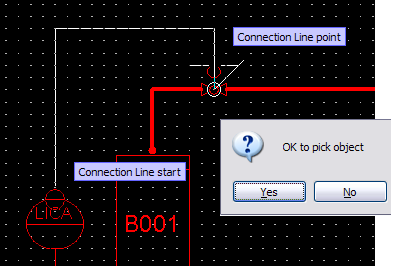
Note: The big red circles at the instrumentation symbol and at the quadrant of the actuator indicate that the line is connected and that no any auxiliary connect command is needed.
If the big red circle appears at the connection point, no any auxiliary connection command is needed.
If you select New Connection Point, you have to select the valve body, not the actuator when creating the connection. This is because the actuator is a label, not a diagram object. When you use flexible valve, the actuator is a part of the diagram object.
-
Press Esc to exit the routing mode.
You have now connected and routed an instrument line between an instrument symbol and a valve.