With the commands Hatches, Hatch , and Bhatch , you can create a closed area filled with a hatch pattern. The available hatch patterns are defined in hatch pattern definition files (default cads.pat). Hatch pattern definition files are text files that you can edit with a text editor.
You can create new hatch patterns by writing their definitions in a hatch pattern definition file. Hatch patterns are constructed of fairly complicated recurring line patterns.
The system variable HPFILE contains the names of the files, from which program looks for hatch pattern definitions.
Learn more:
Hatch pattern syntax
An asterisk starts a new pattern definition, followed by the pattern name and an optional description:
* Pattern name [,description]
This is followed by one or more lines of pattern definitions, which define the shape and contents of the pattern:
angle,x-origin,y-origin,delta-x,delta-y [line_segment-1,line_segment-2,..-.]
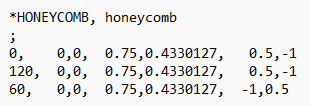
where
angle – Line group angle relative to horizontal
x-origin – Line start point x value relative to origin
y-origin – Line start point y value relative to origin
delta-x – Offset between two adjacent line groups. This property is significant only when using dashed lines.
delta-y – Offset between two adjacent line groups
[line_segment-1,line_segment-2,...] – Dashed line length. This property is significant only when using dashed lines.
The hatch pattern file may also contain comment lines starting with ;
Examples
-
A typical cross-hatch pattern, which draws parallel lines, can be defined as follows:
-
If you want to create a hatch pattern consisting of dashed lines, where the length of a single dash segment is 0.5 length units (line_segment-1), the gap between two segments is 1 length unit (line_segment-2), and the distance between two dashed lines is 1 unit (delta-y), the definition is written as follows:
-
The following clarifies the significance of setting the origin. Suppose you want to create a hatch pattern that draws crosses. A cross can be drawn in many ways. What matters is that the vertical and horizontal dashed lines line up to always form a cross.
The hatch pattern definition is as follows:
*Cross, Regular cross
0, 0, 0.25, 0, 1, 0.5, – 0.5 90, 0.25, 0, 1, 0.5, – 0,5
*LINE, parallel horizontal lines
0, 0, 0, 0, 1
This draws horizontal lines starting from the origin of the hatch pattern. Delta-x is zero because the line is continuous, and delta-y is 1. If the scale factor given for the hatch is 1, the lines are drawn 1 mm apart. If the scale factor is 100, the lines are drawn 100 mm apart. If delta-y in the pattern definition were 100, a scale factor of 1 would naturally result in a spacing of 100 mm between the lines.
Note that the hatch command for an area also specifies the hatch direction angle. This means that the LINE hatch type can naturally also be used to create, for example, cross-hatching at a 45-degree angle by specifying an angle of 45 degrees with the command.
*Dash, Dashed line, double spacing
0, 0, 0, 0, 1, 0.5, -1
As you can see, the negative line segment means an empty space i.e. "drawing a line with the pen up".
If you want the same dashed line to be drawn so that adjacent dashed lines are staggered, delta-x is used. The hatch pattern definition is as follows:
*Dash2, Dashed line, double spacing, staggered
0, 0, 0, 0.75, 1, 0.5, -1
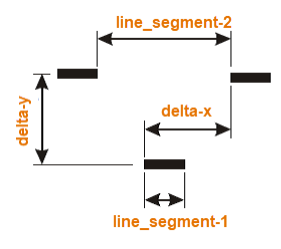
Since delta-x represents the offset of the new line in the direction of the line, in order for the dash segment of the second line to fall in the middle of the empty segment of the previous line, the start of the previous line must be shifted by the length of the dash segment (0.5) + (gap segment length)/2, i.e. 0.75. This means the dash segment of the second line ends at 1.25, leaving a gap of 0.25 on either side. This is best understood by looking at the image below and experimenting yourself.
Assume that the origin of the hatch is at the bottom-left corner of the cross (see image). Horizontal lines are then drawn starting from point 0, 0.25, spaced 0.5 units apart, each 0.5 units long. This creates the horizontal line of the cross. The vertical line of the cross must start at 0.25, 0 in order to form the cross. The other values for the vertical line are exactly the same as for the horizontal line.
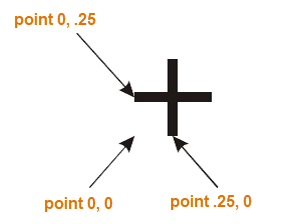
The same pattern can also be defined as follows:
*Cross, Regular cross
| 0, | 0, 0, | 0, | 1, | 0.5, -0.5 |
| 90, | 0.25, -0.25 | 0, | 1, | 0.5, -0.5 |
If you now want to create a hatch pattern that produces similar crosses but with the difference that the crosses are not in a row (instead, every other cross is on the same line) the hatch pattern definition is as follows:
*Cross2, Staggered crosses
| 0, | 0, 0, | 1, | 1, | 0.5, -1.5 |
| 90, | 0.25, -0.25 | 1, | 1, | 0.5, -1.5 |
That is, delta-x is 1 unit, which creates the staggering. In addition, the empty gap is -1.5 units, because due to the staggering, one line no longer has lines as densely spaced as in the regular cross-hatch pattern.