Work breakdown structure
The work breakdown structure is a tree in Hull Viewer that represents the construction parts.

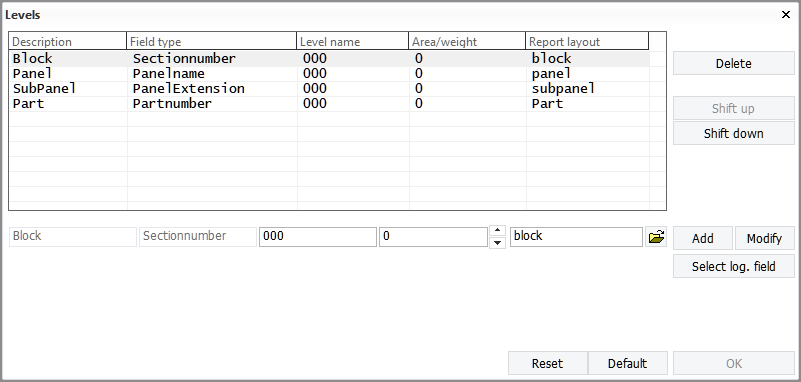
You can define the work breakdown structure, that is, which logistical records will be used for assembly sketches and for Hull Viewer in System Management > Production > Work Breakdown Structure > Levels.
The structure consists of logistical fields as defined in the logistical layout. The following principles apply.
-
A work breakdown level is one step in your assembly process.
-
Four levels have been pre-defined by default. The maximum number of levels is 16, so up to 12 levels can be added to the default configuration.
-
The system covers four levels: Block–Sectionnumber, Panel–Panelname, SubPanel–PanelExtension, and Part–Partnumber.
-
Logistical data can be changed from each work breakdown level.
-
Assembly order controls the presentation of the work breakdown tree.
-
Part or/and levels can be moved or shifted within the tree.
-
For each level, a WBD 3D sketch can be generated.
-
For each level, WBD 2D drawings and sketches can be generated.
-
The level name can be used as reference name used by the marking line of the coded part.
-
Sheet drawings can be made from each WBD level tree structure.
In the default configuration, the first level is the block and the last level is the part. The first row defines the root level of the tree. In the default configuration, the root shows the block number. The second row is the panel name, which is a custom value stored in the logistical database. A tree node is created for each unique panel name as well as their sub-panels.

Location of the WBD configuration files
The location of the work breakdown configuration files wbd.dat and wbd_sketch.dat was changed in CADMATIC Hulll version 2024T1. The location is the norms/cvar folder in the project. A project can have multiple norms, and previously each set of norms could have its own work breakdown configuration. Consequently there could be multiple wbd.dat and wbd_sketch.dat files in the project.
From CADMATIC Hull 2024T1 onwards there can only be one WBD configuration in the project.
Automatic copying of WBD configuration files in older projects
When a project created in an earlier version of CADMATIC Hull is opened in version 2024T1 or later, the system will copy one existing set of the WBD configuration files from the project's norms to the norms/cvar folder in the project. The existing configurations will not be merged. The system will copy one existing complete configuration to norms/cvar.
The system selects which WBD configuration to copy according to the following criteria:
-
First the system attempts to copy the configuration files from the norms associated with the Hull block group.
-
If the project does not contain the Hull block group, or if the configuration files in the norms associated with the Hull block group are incomplete, the system checks the norms associated with each block group in the project, in the order they are listed in the projectinfo.xml file, and copies the first complete configuration found.
Note: If a complete WBD configuration is not found within the project, the system will show a notification. The Hull Administrator can then define the work breakdown structure in System Management > Production > Work Breakdown Structure > Levels.
Once the copying is completed, the system updates the general project data, and automatically saves it to COS. Then Send Settings is triggered automatically. Note that for saving the general project data data and for triggering Send Settings, the Hull project general data set must be checked out. If no site in the COS network has checked out Hull project general, the Hull Administrator on one site in the network must check it out and then re-open the project. This will trigger saving the general project data and the Send Settings action.
Note: While the work breakdown configuration is project wide, any report layout defined for a WBD level is expected to still be in, and used from %ncgnorms%.