Selecting parts
Open the Save Hull Library model dialog by selecting Tools > Tools > Hull Library > Save in 3D-Contek.
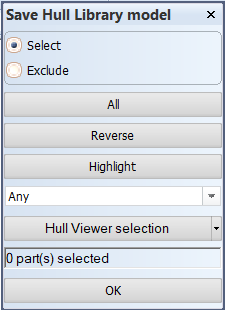
There are several methods for selecting parts. First decide whether you want to select (include) or exclude items.
- Indicate items in the graphical window: Point to one item (cross-hair selection) or select several items by dragging a box around them (clump/conflict selection).
- Select all parts by clicking All.
- Logistical selection: Select the items from the drop-down menu.
- Hull Viewer selection: Select the parts that have been selected in Hull Viewer.
Clicking Highlight highlights the already selected items.
Clicking Reverse reverses your current selection: All the unselected items are selected, and all the selected items are unselected at the same time.