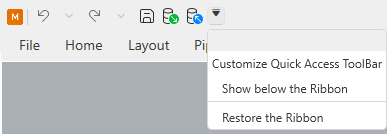
Quick access toolbar
You can add your most frequently used commands to the Quick Access Toolbar, and remove them if usage decreases. If a command you add to the quick access toolbar includes a menu in the ribbon toolbar, then the menu is available also in the Quick Access Toolbar.
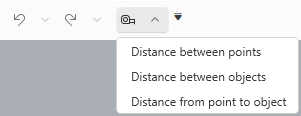
-
You can add items to the Quick Access Toolbar by right-clicking the command in the File menu or the ribbon toolbar and selecting Add to quick access bar.
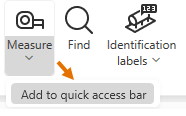
-
You can remove an item from the Quick Access Toolbar by right-clicking the item, either in its original location or in the Quick Access Toolbar, and selecting Remove from quick access bar.
You cannot remove the default commands: Undo and Redo.

-
You can position the Quick Access Toolbar above or below the ribbon toolbar, and minimize or restore the ribbon toolbar, through the customization menu.