Add functional code
Functional Code (named also as Functional Descriptions) is a configuration object in the project. Together with Component Classes it forms the hierarchy for Specifications. In this example you will add a functional code (user defined lateral) into a component class “Branches”.
-
In Project Environment browse item Configuration / Common and edit “Component Classes” object.
-
Select Component Class “Branches” (name may vary) which type is “Branches”.
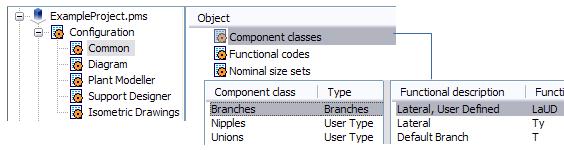
-
Click New Functional Code at the bottom of the panel.
-
Give the following parameters:
-
Description: Lateral, User Defined
-
Mapping: Real Part
-
Type: Standard
-
Functional Code: LaUD
-
Number of Spec Keysizes: 2 (T-piece may have two different NS sizes).
-
Allowed geometry types: DM_GT_LATERAL (nr 9)
-
Note: To modify functional code, you have to de-assign it first from the component class and then use command Configuration / Common / Functional Codes. If the component class is referred by a specification, the functional code can't be modified.