Assigning objects to alternative spaces
In the Properties pane, you can assign the selected model object, or the whole group (a spool or a logistics unit) it is part of, to another 3D space. This alternative space can be at the same hierarchical level as the current containment, or it can be on a higher or lower hierarchical level and overlap the current containment. The number of available alternative spaces depends on the Containment setup. The tool will automatically request ownership and check out the required objects and groups, leaving them in that state unless the user cancels the tool.
Do the following:
-
Select the model object to assign, or one member of the group to assign, from a work view.
-
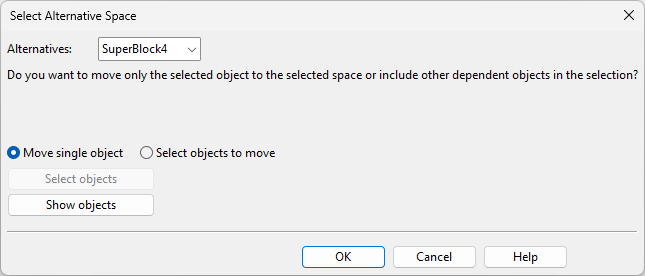
In the Properties pane, on the Basic information tab, scroll down to the Containment information section, click the … button of the current logistics containment, and select Assign to alternative space. If there is at least one alternative 3D space, the Select Alternative Space dialog opens.
-
In the Alternatives field, select the target 3D space from the list, also considering the additional information potentially shown in the dialog.
-
If the containment is determined via the object belonging to a group such as a Duct Spool, all the objects displayed by Show group will be included, and Alternatives will only list 3D spaces whose setup allows containment inheritance from this type of group.
-
If the containment is determined via the object belonging to a Main Document group that already has a document, all the objects displayed by Show group will be included, and Alternatives will only list 3D spaces whose setup allows containment inheritance from this type of group.
-
If the containment is determined via the object being a Pipe Spool Candidate, all the objects displayed by Show objects will be included in the spool that the tool will create unless you adjust the object set.
-
If the object is part of a run, you can add other parts of the run into the set.
-
-
Click OK. The affected objects are assigned to the designated 3D space.