Define Content or Transparency Rule
This topic describes the COS query editor that opens when you create or edit a content or transparency rule via the Drawing Views dialog or the Visualization and changes pane.
-
Define Content Rule – This editor defines a query that selects objects to show or hide.
-
Define Transparency Rule – This editor defines a query that selects objects to be drawn as transparent.

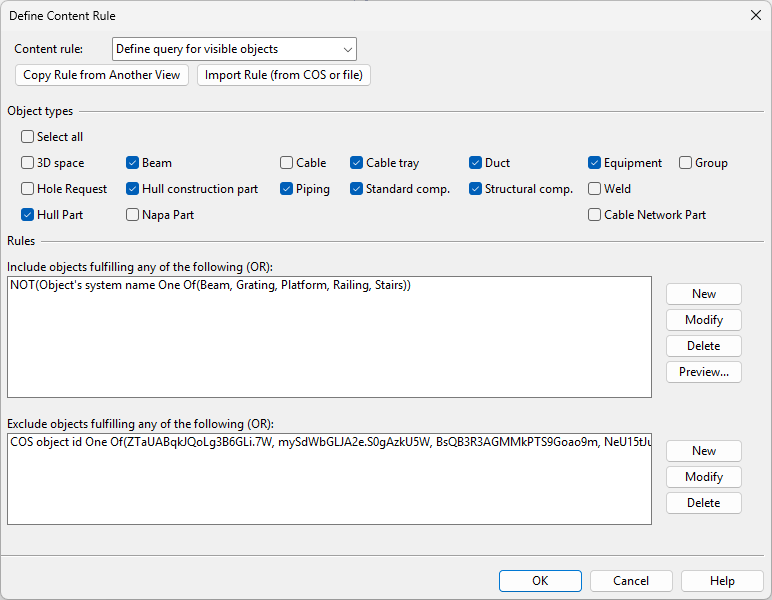
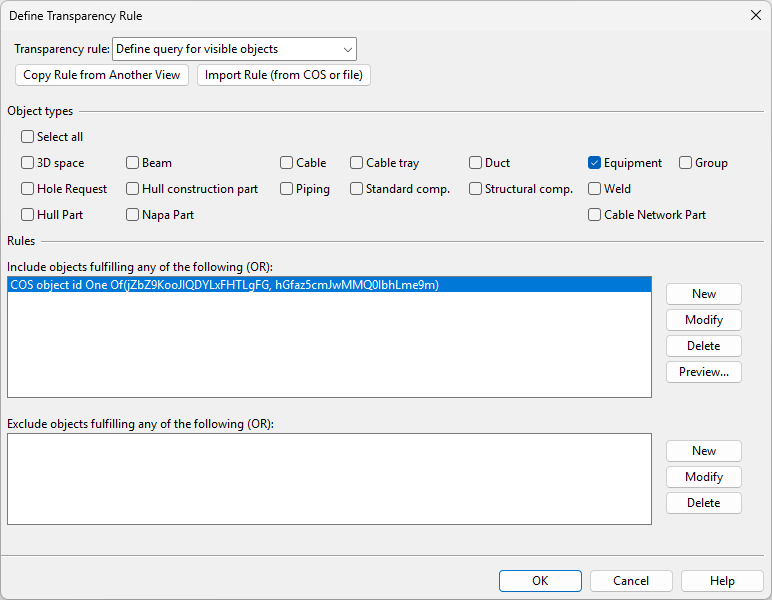
These rule editors are similar to the standard COS Query editor but have fewer settings. In the editor, each sub-rule functions as an additional filtering step; when the query is run, the sub-rules are executed from top to bottom, and each sub-rule refines the result by updating the selection and, as a result, the visibility state of the objects.
Note: Transparency rules cannot make hidden objects visible. Ensure that content rules do not hide objects that should be made transparent.
|
Setting |
Description |
|---|---|
|
Content rule Transparency rule |
|
|
Copy Rule from Another View |
This button opens a menu with the following commands:
|
|
This button opens a dialog with the following commands:
|
|
|
Object types |
Select the object types to which to apply the rules defined in the query. For example, select Piping and clear the other types to select only piping objects with the rule. |
|
Include objects fulfilling any of the following |
In this section, define one or more sub-rules that allow specific objects to be displayed in the drawing view. For example, specify a rule that selects objects whose system name is Water. If Object types is set to Piping, only piping objects that belong to the Water system are selected by the query. |
|
Exclude objects fulfilling any of the following |
In this section, define one or more sub-rules that prevent specific objects from being displayed in the drawing view. For example, specify a rule that selects objects whose modification time is not within two weeks. If Object types is set to Piping and only the Water system is included, only piping objects that belong to the Water system and have not been recently modified are selected by the query. |