Reports
Reports present geometrical and logistical data of parts. They are mainly used to present part information for manufacturing purposes.
Report can be created with the Production > Report > Create Report function.
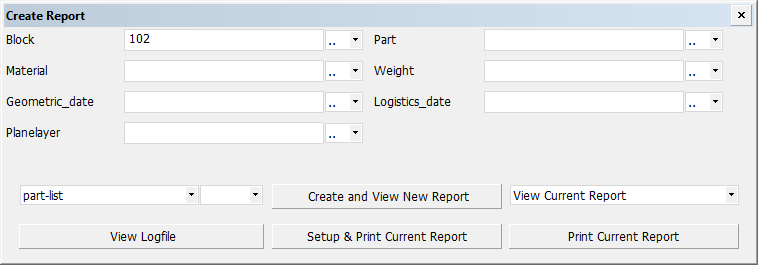
Part selection criteria is defined in the Create Report dialog. It is possible to create a report including parts in more than one building block.
See Creating reports for detailed information on creating reports.
Report layouts
Parts can be presented in various layouts (the part-list report layout is selected in the image above). Report layouts are defined in Production > Reports > Report Layout in the System Management application.
When a report layout has been created, information from the construction database can be included in the report. Depending on the report layout, identical parts can be grouped together and presented in one line as just one part, but still included in the total part count. See Logistical Selection Menu.
Note on weld information in reports
Weld information can be included in reports by adding weld related derived data fields in the report layout. However, if the report layout contains more than one weld related derived data field, the report will only contain parts that have weld information. This means that parts which do not have bevels will be left out from the report if several weld related derived data fields are used.