Opening models
Hull Viewer can open four different file formats: Eagle models, Hull Viewer models, 3D Dump models and 3D Hull models.
Eagle models
Eagle models (.mod) can be created by selecting parts in CADMATIC Hull in 3D-Contek. Eagle model files contain all required geometric information in order to display the models correctly. They also contain a small selection of logistic information of the parts which can be presented in the Item information dialog.
Hull Viewer models
Hull Viewer models (.hvm) are created by CADMATIC Hull, see Hull Viewer models.
3D Dump models
3D Dump models (.3dd) can be created by CADMATIC. These files contain only the required geometric information.
3D Hull models
3D Hull models (.3hm) can be created by Hull Viewer. These files contain all required geometric information and also all related logistical data and settings.
These files can be opened in three different ways:
- By opening the models as files (see Opening models as files).
- By dropping one or more files from Windows Explorer into Hull Viewer's client area.
- By double-clicking a model file in Windows Explorer, if Hull Viewer is set up as the default viewer.
Opening models as files
Hull Viewer can open Eagle models, Hull Viewer models, 3D Dump models and 3D Hull models to display constructions. The Eagle models are usually created by CADMATIC Hull, but the viewer itself can also save the collection of parts it is displaying into a .mod file or a .3hm file (see Saving views and models).
Open a file in Hull Viewer from File > Open, click the  button, or use the keyboard shortcut Ctrl + O.
Browse to select the desired file. The options in the lower part of the dialog allow you to shift and/or mirror the model. These options do not affect .3hm models.
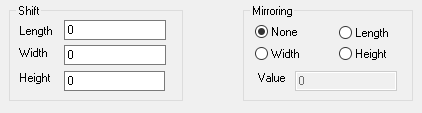
When specifying both a shift and mirror action, the shift action is performed prior to mirroring.
In contrast to .mod files, you can only open one .3hm file at a time.