Creating pillars
Do the following to create pillars in the 3D-Contek application.
-
Select Construction > Pillars.

-
In the Insert group of the Pillars ribbon, select from the following profile creating functions:
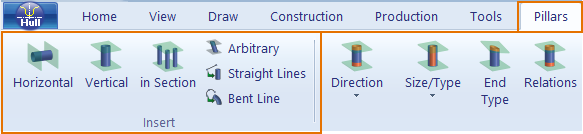
Horizontal – Create horizontal pillars, relative to the active view. See Horizontal / vertical pillars.
Vertical – Create vertical pillars, relative to the active view. See Horizontal / vertical pillars.
in Section – Create multiple pillars in cross-section at grid values. See Pillars in section.
Arbitrary – Create arbitrary pillars. See Arbitrary pillars.
Straight Lines – Create pillars from one or more straight lines.
Bent Line – Create a pillar from a single bent line.
-
Selecting one of these options opens a dialog where you can define the following attributes:
- type of the pillar
- whether the body and flange of the pillar should be coded separately (composite profile)
- relations of the pillar to fixed values
- number of pillars to create
- body size and thickness
- orientation (for pillars in cross-section only)
- body direction and thickness direction (not available for pillars in cross-section)
- material
-
After entering the necessary information, in the next dialog you can to define further limitations and end types. End types are defined automatically for pillars in cross-section.
For more detailed information, see the separate Help topics for the different pillar types: