Selection by mouse
When you right-click on a part in the Hull Viewer graphical window, the part is highlighted and the context menu is shown:
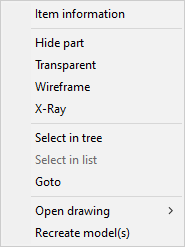
You can select the desired action:
- Item Information – See Item information.
- Hide part – See Display states.
- Transparent / Opaque – See Display states.
- Wireframe / Shaded – See Display states.
- X-Ray – See Work Breakdown Structure.
- Select in tree – See Work Breakdown Structure.
- Select in list – See Work Breakdown Structure.
- Goto – See Goto.
- Open drawing – See Open drawing.
- Recreate model(s) – Opens the Creating 3D models dialog. Disabled when Weld Manager is open.
You can also select parts with the left mouse button. See Selection.