Weld lines related to the shell or shell plates
When bevels are automatically created by the Bevel Generator the system uses the shell plate thickness and material to select the correct predefined bevels according to the rules defined by the system administrator.
See Plate beveling rules for information on defining the beveling rules for plates.
To be shown in shell views, weld lines must be somehow connected to the hull group which is visible in the shell view. Weld lines in shell views are only shown for:
-
Weld lines on shell plates
-
Weld lines on plates at their relations to shell plates or hull lines
Default shell properties
The default shell plate name, material and thickness can be defined in System Management > Extra > Hull Viewer > Weld Manager.

Add a natural bevel relation to a shell plate
If a plate is related to a shell plate and the hull line Relations satisfy the following conditions, the system tries to find the default bevel for this relation.:
- The relation is a complete relation
- The relation has no parallel distance to the shell plate
This means that the starting and ending angle of the relation to the shell plate are calculated, and the proper predefined bevel is selected according to the rules defined in System Management > Construction > Welds/Bevels -> Plate Bevel Rules. See Defining bevel rules for the different connections.
Plates which have a connection to a shell plate or the shape surface use their width after taking the bevel shape into account. This helps ensure a situation similar to case one pictured below, where the bevel causes the plate to line up properly with the shape surface, instead of the second case where the plate overlaps with the shape surface.
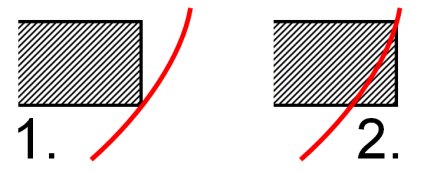
When no bevel condition can be found, the system will use the shortest connection with a shape, which is similar to an I type bevel.
Shell properties in Excel
Shell name, thickness, and material can also be exported to an Excel file using the corresponding keywords in the Excel template document. See Export type Excel.
The keywords for the shell plate are as follows:
- weldmat2 – shell plate material
- weldpart2 - shell plate name, as defined by the weldpartname entry in the configuration file
- weldth2 – thickness of the shell plate
The shell plate is always the 2nd part which is the part to be welded to the 1st part that has the bevel.